CodeByAkram

Read Files from classpath or resource folder and subfolder - Java

 The below code shows hot to read the list of resources(files) from a classpath folder and subfolder.

Below is the example code


import java.io.*;
import java.net.URL;
import java.nio.file.Files;
import java.util.*;

public class ReadResourceFiles {

    public static void main(String[] args) throws IOException {
        List resourceFolderFiles = getResourceFolderFiles("static");
        resourceFolderFiles.stream().filter(f -> f.endsWith(".json")).forEach(System.out::println);
    }

    static List getResourceFolderFiles(String folder) {
        ClassLoader loader = Thread.currentThread().getContextClassLoader();
        URL url = loader.getResource(folder);
        String path = url.getPath();
        File file = new File(path);
        List files = new ArrayList<>();
        if(file.isDirectory()){
            try {
                Files.walk(file.toPath()).filter(Files::isRegularFile)
                        .filter(f-> f.toFile().getName().toLowerCase().endsWith(".json"))
                        .forEach(f -> files.add(f.toFile().getPath()));
            } catch (IOException e) {
                throw new RuntimeException(e);
            }
        }else if(file.getName().toLowerCase().endsWith(".json")){
            files.add(file.getPath());
        }
        return files;
    }
}

How to push data to solace queue using JMS?

 In this blog, lets check how we can push the data to solace mq or solace queue using JMS. Message queues are the endpoints which guarantees you the delivery of a message without fail.

So to implement the Java code to push messages, first add the below dependency in pom.xml file if you are using the maven project in case.

<dependency>

<groupId>com.solacesystems</groupId>

<artifactId>sol-jms</artifactId>

<version>10.10.0</version>

</dependency>

 You can find the latest version of sol-jms from  Solace Queue Maven

Below is the sample program to push the message to Solace Queue by using JMS. Please enter your queue connection details.

package com.services.impl;

import java.util.Properties;
import javax.jms.Connection;
import javax.jms.ConnectionFactory;
import javax.jms.DeliveryMode;
import javax.jms.JMSException;
import javax.jms.MessageConsumer;
import javax.jms.MessageProducer;
import javax.jms.Session;
import javax.jms.TextMessage;
import javax.naming.Context;
import javax.naming.InitialContext;
import javax.naming.NamingException;
import org.apache.log4j.Logger;
import com.solacesystems.jms.SolQueue;
import com.solacesystems.jms.SolTopic;
import com.solacesystems.jms.SupportedProperty;

public class PushData {

	private final static Logger logger = Logger.getLogger(PushData.class);

	public String pushDataToSolaceQueue(String requestText) {
		TextMessage textMessageToSend = null;
		String response = null;
		Session session = null;
		MessageProducer queueSender = null;
		MessageConsumer queueReceiver = null;

		Connection connection = null;
		String messageID;
		Properties env = new Properties();
		env.put(InitialContext.INITIAL_CONTEXT_FACTORY, "com.solacesystems.jndi.SolJNDIInitialContextFactory");
		env.put(InitialContext.PROVIDER_URL, "enter providerURL");
		env.put(Context.SECURITY_PRINCIPAL, "enter userName");
		env.put(Context.SECURITY_CREDENTIALS, "Enter password");

		env.put(SupportedProperty.SOLACE_JMS_VPN, "Enter VPN Name");

		env.put(SupportedProperty.SOLACE_JMS_JNDI_CONNECT_TIMEOUT, 60000);
		// InitialContext is used to lookup the JMS administered objects.
		InitialContext initialContext;
		try {
			initialContext = new InitialContext(env);

			// Lookup ConnectionFactory.
			ConnectionFactory cf = (ConnectionFactory) initialContext.lookup("Enter Connection Factory");

			// JMS Connection
			connection = cf.createConnection();
			// Create a session
			// Create a non-transacted, Auto Ack session.
			session = connection.createSession(false, Session.AUTO_ACKNOWLEDGE);

			textMessageToSend = session.createTextMessage("");
			textMessageToSend.setText(requestText);
			textMessageToSend.setJMSType("mcd://xmlns");
			textMessageToSend.setJMSDeliveryMode(DeliveryMode.PERSISTENT);
			// textMessageToSend.setJMSReplyTo((Destination) responseQueue);
			Object torQ = initialContext.lookup("request topic here");
			if (torQ instanceof SolTopic) {
				logger.info("assigning the request to a SolTopic");
				SolTopic requestTopic = (SolTopic) torQ;
				queueSender = session.createProducer(requestTopic);
				logger.info("sending message");
				queueSender.send(requestTopic, textMessageToSend);

			} else {
				logger.info("assigning the request to a SolQueue");
				SolQueue requestTopic = (SolQueue) torQ;
				queueSender = session.createProducer(requestTopic);
				logger.info("sending message");
				queueSender.send(requestTopic, textMessageToSend);
			}
			logger.info("pushDataToSolaceQueue() : message sent to queue is " + textMessageToSend.getText());
			// remember the messageID
			messageID = textMessageToSend.getJMSMessageID();
			logger.info("MessageID is " + messageID);
			connection.start();
			response = messageID;

			return response;

		} catch (JMSException jmsException) {
			logger.error("JMSException occurred due to " + jmsException.getLinkedException(), jmsException);

		} catch (NamingException jmsException) {
			logger.error("NamingException occurred  due to " + jmsException.getMessage(), jmsException);

		} catch (Exception exception) {
			logger.error("Unhandeled exception occurred  due to " + exception.getMessage(), exception);

		} finally {
			if (queueReceiver != null) {
				try {
					queueReceiver.close();
				} catch (Exception e) {
					logger.error("Exception in closing the Queue Receiver: " + e.getMessage());
				}
			}
			if (queueSender != null) {
				try {
					queueSender.close();
				} catch (Exception e) {
					logger.error("Exception in closing the Queue Sender: " + e.getMessage());
				}
			}
			if (session != null) {
				try {
					session.close();
				} catch (Exception e) {
					logger.error("Exception in closing the Queue Session: " + e.getMessage());
				}
			}
			if (connection != null) {
				try {
					connection.stop();
				} catch (Exception e) {
					logger.error("Exception in stopping the Queue Connection: " + e.getMessage());
				}
				try {
					connection.close();
				} catch (Exception e) {
					logger.error("Exception in closing the Queue Connection: " + e.getMessage());
				}
			}
		}
		return response;
	}

}
How to use / implement OWASP ESAPI Logger in Java

Before going further lets talk about Log Forging or JVM Log Forging. 

Log Forging

According to OWASP , writing invalidated logs can allow attackers to forge log or inject malicious content in log file. Log forging is when attackers tries to add/modify the log content by exploring the security loopholes of application.

Lets understand the log forging by an example.


private void printLog(String amount) {
logger.info("Amount credited in account Rs. {}" + amount);
}
above code will print the logs like:

Amount credited in account Rs. 500

 Now suppose attacker provide the input \n\n Amount debited in account Rs.500

Amount credited in account Rs. 500

Amount debited in account Rs.500

So, attacker forged the logs by making a fake or forge entry in log.


Avoid directly embedding user input in log files when possible. Sanitize untrusted data used to construct log entries by using safe logging mechanism such as OWASP ESAPI logger, which will automatically remove unexpected carriage returns. So, to prevent this, we use use ESAPI Logger mechanism.

Here is the dependency of ESAPI: 

<dependency>

<groupId>org.owasp.esapi</groupId>

<artifactId>esapi</artifactId>

<version>2.2.2.0</version>

</dependency>

We can encode the logs using ESAPI‘s Encoder method and interface:


    public String encode(String message) {
    message = message.replace( '\n' ,  '_' ).replace( '\r' , '_' )
      .replace( '\t' , '_' );
    message = ESAPI.encoder().encodeForHTML( message );
    return message;
}
How to use / implement OWASP ESAPI Logger in Java


Multi threading using Executor Services in Java

 The ExecutorService interface, executes tasks in parallel in background and represents an asynchronous execution mechanism. The ExecutorService create and maintain the reusable thread pool.


How to create ExecutorService?

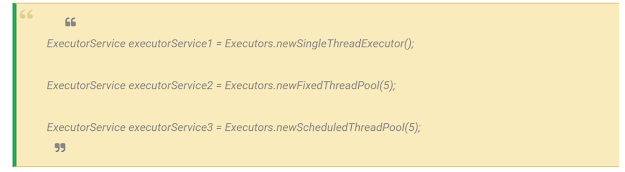
To create ExecutorService, you can use Executors factory to create the instance of ExecutorService. Lets see some examples.


 There are diffrent way to execute or submit the task with ExecutorService.
  1. submit(Runnable)
  2. submit(Callable)
  3. execute(Runnable)
  4. invokeAny(...)
  5. invokeAll(...)
Lets go through with the example to run multiple treads with ExecutorService.

import java.util.concurrent.ExecutorService;
import java.util.concurrent.Executors;

public class HTMLUnitMultipleThreads {

	public static void main(String[] args) {

		int threadSize = 5;
		ExecutorService executor = Executors.newFixedThreadPool(threadSize);
		for (int i = 0; i < threadSize; i++) {
			executor.submit(new MultiThreadingService());
		}
	}
}

public class MultiThreadingService implements Runnable {

	@Override
	public void run() {
		for (int i = 0; i < 10; i++) {
			System.out.println("Thread Name = " + Thread.currentThread().getName());
		}

	}

}

Getting Started with Angular

We have setup the development setup of angular in angular-installation blog. Now in this blog, lets start a new project and lets see how we can create a new project in Angular.

How we can create a new project in Angular?

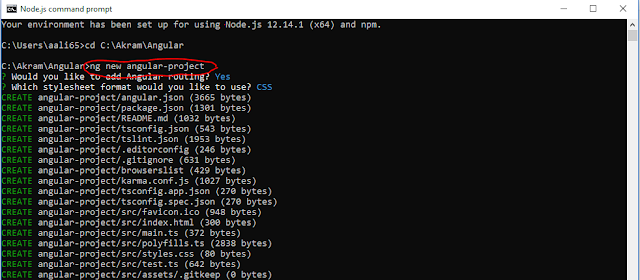
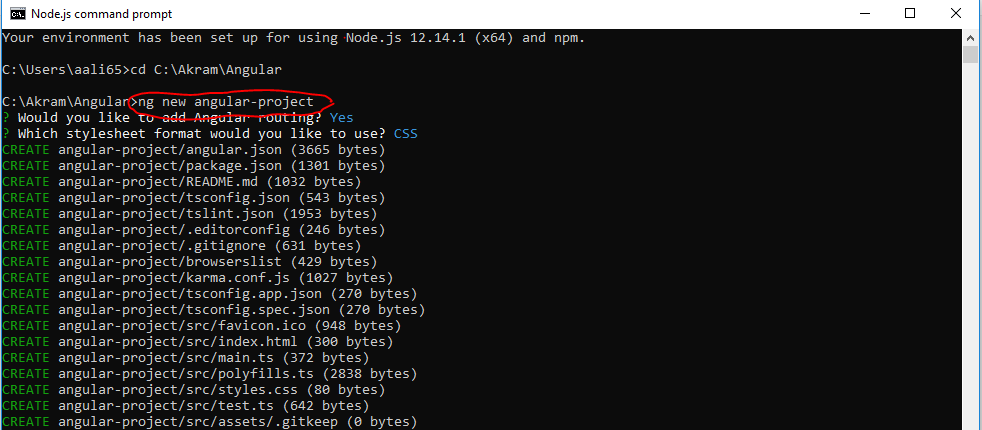
To create a new project, open Angular CLI and type below mentioned command and press enter. This will take some time to create an ready to build application for you.


ng new angular-project

To create a new project, open Angular CLI and type below mentioned command and press enter. This will take some time to create an ready to build application for you.


Now this will create a full ready to build angular application. In below image you can see the full folder structure of angular application.

full folder structure of angular application
We'll be mainly working in the src folder.

Run or Serve application

You can build and run the application by using below CLI command. The default port for angular application is 4200.

Go to angular-project folder and then run the application.

cd angular-project
ng serve
build and run the application by using below CLI command


We can open this application on our browser at http://localhost:4200/

We can open this application on our browser at http://localhost:4200/


So this application is working fine. If you are facing some problem while running your application , let me know in comments section.

Angular Installation

Lets talk about the installation process of Angular, which tools and IDE is required for angular,

How to install Angular?

Which IDE is used for angular?

Before getting started with Angular you have to download IDE like Visual Studio Code, Eclipse, Atom etc.

We will be using Visual Studio Code in our tutorial.

Visual Studio Code is open source and it is light weight, easy to use. It has vast range of built-in code formatting, editing and refactoring features.

You can download Visual Studio Code from: https://code.visualstudio.com

Install Node.js

You should install node.js to run the angular application, node.js provides npm dependencies and required libraries.

You can download and install node.js from: https://nodejs.org/en/

After node.js installation you will see the below command prompt.

You should install node.js to run the angular application, node.js provides npm dependencies and required libraries

Angular CLI

Angular app is mainly developed and run by the CLI, that helps in creating new project, adding files and other task.

To install Angular globally run below command or go to Angular official site https://cli.angular.io/ 

1. Run npm install -g @angular/cli on Node.js command prompt. This command will globally install angular on your system.
CodeByAkram - Run npm install -g @angular/cli on Node.js command prompt

2. Now you need to create a new angular app/project by using this command ng new my-dream-app
CodeByAkram - command ng new my-dream-app

3. Go to project directory using cd my-dream-app command and hit ng serve command to run the angular application.
CodeByAkram - hit cd my-dream-app command and hit ng serve command to run the angular application.

4. Now open http://localhost:4200/ in browser and will see angular app running in browser.
CodeByAkram - will see angular app running in browser.


What is Angular

Code by Akram - What is Angular

Angular is a latest front-end framework of JavaScript, a development platform for building mobile and desktop web applications that makes you able to create reactive SPA (Single Page Applications). Angular framework is developed and main by Google. Angular framework is totally based on components forming a tree based on parent child component.

Angular comes with many features such as Component, Pipes, Directives, Forms, Dependency Injections etc.

SPA (Single Page Application)

Single page application or SPA is a website or web application which provides very extensive and fast experience to users. When user click on any menu, button or link it dynamically re-write the url instead of loading the entire page.


Angular

Angular Tutorial: Getting Started With Angular 


Welcome to Angular tutorials, in this tutorial i will cover all the topics of angular and after this tutorial you will be able to write the code of angular.

Angular Tutorial: Code By Akram


So lets start the tutorial step by step.

  1. What is Angular
  2. Installation
  3. Getting Started with Angular 
  4. Angular Features
  5. Differences between AngularJS and Angular
  6. Angular Directives
  7. Angular Pipes
  8. Angular Databinding
  9. Angular CLI
  10. Forms

Write a program to print first non repeated char in a string in Java.


Write a program to print first non repeated char in a string in Java.

We are using the HashMap to store the character as key and count of times it is repeated as value.


package com.string.codebyakram;

import java.util.HashMap;

public class NonReapingCahr {
 public static void main(String[] args) {
  String string = "hello";
  System.out.println(findNonReapingCahr(string));
 }

 public static char findNonReapingCahr(String string) {

  HashMap< character > countChar = new HashMap<>();

  for (int i = 0; i < string.length(); i++) {
   int count = countChar.get(string.charAt(i)) == null ? 1 : countChar.get(string.charAt(i)) + 1;
   countChar.put(string.charAt(i), count);
  }

  for (int i = 0; i < string.length(); i++) {
   if (countChar.get(string.charAt(i)) == 1) {
    return string.charAt(i);
   }
  }
  return '\0';

 }
}

How to create multiple log file using same log4j property file?

You can create multiple logs file by using same log4j properties file or you can send logs to multiple files by using same log4j file.

How to create multiple log file using same log4j property file?
Add this below to your log4j properties file.

log4j.rootLogger=TRACE, stdout
log4j.appender.dataLogs=org.apache.log4j.FileAppender
log4j.appender.dataLogs.File=logs/logFile1.log
log4j.appender.dataLogs.layout=org.apache.log4j.PatternLayout
log4j.appender.dataLogs.layout.ConversionPattern=%d [%24F:%t:%L] - %m%n
log4j.appender.reportsLog=org.apache.log4j.FileAppender
log4j.appender.reportsLog.File=logs/logFile2.log
log4j.appender.reportsLog.layout=org.apache.log4j.PatternLayout
log4j.appender.reportsLog.layout.ConversionPattern=%d [%24F:%t:%L] - %m%n

log4j.category.dataLogger=TRACE, dataLogs
log4j.additivity.debugLogger=false
log4j.category.reportsLogger=DEBUG, reportsLog
log4j.additivity.reportsLogger=false
Then configure the loggers in the code accordingly as shown below:

static final Logger debugLog = Logger.getLogger("dataLogger");
static final Logger resultLog = Logger.getLogger("reportsLogger");

How to delete log4j/log file older than N number of days?

How to delete log4j/log file by N number of days?

package com.avaya.deletelogs;

import java.io.File;
import java.io.FilenameFilter;
import java.util.Arrays;
import java.util.List;

public class DeleteLogs {

 private String baseDir = "/opt/java/IVRLog";
 private int daysBack = 4;

 public void invokeProcess() {
  getFolders();
 }

 public void getFolders() {

  try {
   File file = new File(baseDir);
   String[] directories = file.list(new FilenameFilter() {

    public boolean accept(File current, String name) {
     return new File(current, name).isDirectory();
    }
   });
   deleteFiles(daysBack, baseDir, Arrays.asList(directories));
  } catch (Exception e) {
   System.out.println(e);
  }
 }

 public void deleteFiles(int daysBack, String dirWay, List< string> directories) {
  for (String dir : directories) {
   deleteFilesOlderThanNdays(daysBack, dir);
  }

 }

 public void deleteFilesOlderThanNdays(int daysBack, String dirWay) {

  File directory = new File(baseDir + "/" + dirWay);
  if (directory.exists()) {

   File[] listFiles = directory.listFiles();
   long purgeTime = System.currentTimeMillis() - (daysBack * 24 * 60 * 60 * 1000);
   for (File listFile : listFiles) {
    try {
     if (listFile.isFile()) {
      if (listFile.lastModified() < purgeTime) {
       if (!listFile.delete()) {
        System.err.println("Unable to delete file: " + listFile);
       }
      }
     } else {
      continue;
     }
    } catch (Exception e) {
     System.out.println(e);
    }
   }
  }
 }

}

What do you mean by Aspect, Join Point, Advice?


What’s the difference between @Component, @Controller, @Repository & @Service annotations in Spring?

What do you mean by Aspect, Join Point, Advice?

Pointcut: Pointcut are expressions that is matched with join points to determine whether advice needs to be executed or not. Pointcut uses different kinds of expressions that are matched with the join points and Spring framework uses the AspectJ pointcut expression language.
AOP Advice Types
Before Advice: These advices run before the execution of join point methods. Use @Before annotation to mark an advice type as Before advice.
After (finally) Advice: An advice that gets executed after the join point method finishes executing, whether normally or by throwing an exception. We can create after advice using @After annotation.
After Returning Advice: Sometimes we want advice methods to execute only if the join point method executes normally. We can use @AfterReturning annotation to mark a method as after returning advice.
After Throwing Advice: This advice gets executed only when join point method throws exception, we can use it to rollback the transaction declaratively. We use @AfterThrowing annotation for this type of advice.
Around Advice: This is the most important and powerful advice. This advice surrounds the join point method and we can also choose whether to execute the join point method or not. We can write advice code that gets executed before and after the execution of the join point method. It is the responsibility of around advice to invoke the join point method and return values if the method is returning something. We use @Around annotation to create around advice methods.

What’s the difference between @Component, @Controller, @Repository & @Service annotations in Spring?


Spring Annotations, Codebyakram


Spring 2.5 introduces further stereotype annotations: @Component@Service, and @Controller@Component is a generic stereotype for any Spring-managed component. @Repository@Service, and @Controller are specializations of @Component for more specific use cases, for example, in the persistence, service, and presentation layers, respectively.

You may also like What do you mean by Aspect, Join Point, Advice?

Therefore, you can annotate your component classes with @Component, but by annotating them with @Repository@Service, or @Controller instead, your classes are more properly suited for processing by tools or associating with aspects. For example, these stereotype annotations make ideal targets for pointcuts.

Thus, if you are choosing between using @Component or @Service for your service layer, @Service is clearly the better choice. Similarly, as stated above, @Repository is already supported as a marker for automatic exception translation in your persistence layer.


Differentiate between constructor injection and setter injection

Partial Dependency

In Setter Injection, partial dependency is possible, means if we have 4 dependencies as mentioned below,

Differentiate between constructor injection and setter injection, codebyakram


Then it is not necessary to inject all values if we are using setter injection.

But in Constructor Injection, partial dependency is not possible because we are calling the constructor of that class.

Overriding

Constructor Injection can not override the setter injected properties but Setter injection can override the constructor injected properties.

Changes

Setter injection makes bean class object as mutable but constructor injection makes bean class object as immutable. 

Number of dependencies

If we have dependencies for example 17 in our bean class then, in this case setter injection is not recommended as we need to write almost 17 setters right, bean length will increase.

In this case, Constructor injection is highly recommended, as we can inject all the dependencies with in 3 to 4 lines by calling one constructor.


Java 8 Lambda Comparator

Lets se how we can sort the object by using java 8 lambda comparator. For this let take a Employee class.

Java 8 Lambda Comparator, codebyakram

public class Employee {
    private String name;
    private int salary;
 
    // standard constructors, getters/setters, equals and hashcode
}

1. Classic sort (without lambda)

Comparator< Employee > bySalary = new Comparator< Employee >() {
  @Override
  public int compare(Employee o1, Employee o2) {
   return o1.getSalary().compareTo(o2.getSalary());
  }
 };
2. Lambda expression equivalent.

 Comparator< Employee > bySalary = 
  (Employee o1, Employee o2)->o1.getSalary().compareTo(o2.getSalary());

You may also like to read What do you mean by Aspect, Join Point, Advice?

How to get keys and values from Map in Java?

As we know, map is based on key-value pair associations, so interviewer can ask you this question if you are a beginner or having less than 3 years of experience.

So lets see how we can the key and values from a Map?

How to get keys and values from Map, codebyakram


In Java we have and Map.Entry method that returns a collection-view of map.


Map< string string=""> map = new HashMap<>();

 // Get keys and values
 for (Map.Entry< string string=""> entry : map.entrySet()) {
  String k = entry.getKey();
  String v = entry.getValue();
  System.out.println("Key: " + k + ", Value: " + v);
 }

 // In Java 8 we can use for each
 map.forEach((k, v) -> {
  System.out.println("Key: " + k + ", Value: " + v);
 });

How to set connection timeout for RestTemplate in spring?

How to set connection timeout for RestTemplate in spring? codebyakram

We can set the timeout for RestTemplate by doing some custom configuration for RestTemplate.

First you need to create a class named as HttpClientConfig in this class we configure HttpClient because RestTemplate internally uses the HttpClient.


package com.codebyakram;

import org.apache.http.client.config.RequestConfig;
import org.apache.http.impl.client.CloseableHttpClient;
import org.apache.http.impl.client.HttpClients;
import org.slf4j.Logger;
import org.springframework.beans.factory.annotation.Value;
import org.springframework.context.annotation.Bean;
import org.springframework.context.annotation.Configuration;

@Configuration
public class HttpClientConfig {

 public static final Logger LOGGER = org.slf4j.LoggerFactory.getLogger(HttpClientConfig.class.getName());
 // Determines the timeout in milliseconds until a connection is established.
 private static final int CONNECT_TIMEOUT = 30000;

 // The timeout when requesting a connection from the connection manager.
 
 private int REQUEST_TIMEOUT = 10000;
 
 @Bean
 public CloseableHttpClient httpClient() {
  RequestConfig requestConfig = RequestConfig.custom().setConnectionRequestTimeout(REQUEST_TIMEOUT).build();
  return HttpClients.custom().setDefaultRequestConfig(requestConfig).build();
 }
}

Here in this class we setting HttpClient in RestTemplate

package com.codebyakram;

import org.apache.http.impl.client.CloseableHttpClient;
import org.springframework.beans.factory.annotation.Autowired;
import org.springframework.context.annotation.Bean;
import org.springframework.context.annotation.Configuration;
import org.springframework.http.client.HttpComponentsClientHttpRequestFactory;
import org.springframework.scheduling.TaskScheduler;
import org.springframework.scheduling.concurrent.ThreadPoolTaskScheduler;
import org.springframework.web.client.RestTemplate;

@Configuration
public class RestTemplateConfig {

 @Autowired
 CloseableHttpClient httpClient;


 @Bean
 public RestTemplate restTemplate() {
  RestTemplate restTemplate = new RestTemplate(clientHttpRequestFactory());
  return restTemplate;
 }

 @Bean
 public HttpComponentsClientHttpRequestFactory clientHttpRequestFactory() {
  HttpComponentsClientHttpRequestFactory clientHttpRequestFactory = new HttpComponentsClientHttpRequestFactory();
  clientHttpRequestFactory.setHttpClient(httpClient);
  return clientHttpRequestFactory;
 }

 @Bean
 public TaskScheduler taskScheduler() {
  ThreadPoolTaskScheduler scheduler = new ThreadPoolTaskScheduler();
  scheduler.setThreadNamePrefix("poolScheduler");
  scheduler.setPoolSize(50);
  return scheduler;
 }
}

So now we are done with the cofiguration of request timeout for RestTemplate.

How to Sort a Stack using Merge Sort?

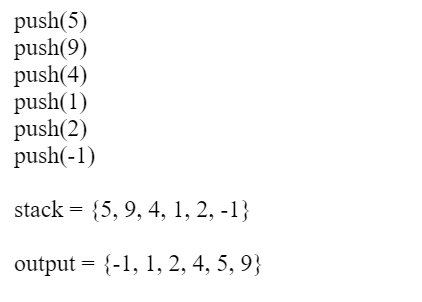
Interviewer may ask you this question if you have more than 3 years of experience in java development. So lets have a look, how to sort a stack using merge sort?

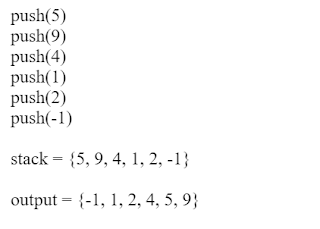
Lets see sample input and output for better understanding:

How to Sort a Stack using Merge Sort? codebyakram


Algorithm
For this we will follow these below two steps,
1. Break the stack into two parts by using two temporary stack.

2. When only one element remains on a Stack, Merge it.

Lets have a look on the program,


package com.codebyakram;
 
import java.util.Stack;
 
public class SortStack {
 
    public static void main(String args[]) {
        Stack stack = new Stack();
        stack.push(5);
        stack.push(9);
        stack.push(4);
        stack.push(1);
        stack.push(2);
        stack.push(-1);

 
        sort(stack);
 
        System.out.println(stack);
    }
 
    private static void sort(Stack stack) {
        Stack s1 = new Stack();
        Stack s2 = new Stack();
 
        while (stack.size() != 0) {
            if (stack.size() % 2 == 0) {
                s1.push(stack.pop());
            } else {
                s2.push(stack.pop());
            }
        }
 
        if (s1.size() > 1) {
            sort(s1);
        }
 
        if (s2.size() > 1) {
            sort(s2);
        }
 
        merge(s1, s2, stack);
    }
 
    private static void merge(Stack s1, Stack s2, Stack stack) {
        Stack mergedStack = new Stack();
        while (!s1.isEmpty() && !s2.isEmpty()) {
            if ((Integer) s1.peek() < (Integer) s2.peek()) {
                mergedStack.push(s2.pop());
            } else {
                mergedStack.push(s1.pop());
            }
        }
 
        while (!s1.isEmpty()) {
            mergedStack.push(s1.pop());
        }
 
        while (!s2.isEmpty()) {
            mergedStack.push(s2.pop());
        }
 
        while (!mergedStack.isEmpty()) {
            stack.push(mergedStack.pop());
        }
    }
}

Adjacency List in Java

An adjacency list represents a graph as an array of linked list.

The index of the array represents a vertex and each element in its linked list represents the other vertices that form an edge with the vertex.

Adjacency List representation
A graph and its equivalent adjacency list representation is shown below.

Adjacency List in Java, codebyakram
An adjacency list is efficient in terms of storage because we only need to store the values for the edges. For a sparse graph with millions of vertices and edges, this can mean a lot of saved space.

Adjacency List Structure
The simplest adjacency list needs a node data structure to store a vertex and a graph data structure to organize the nodes.


We stay close to the basic definition of graph - a collection of vertices and edges {V, E}. For simplicity we use an unlabeled graph as opposed to a labeled one i.e. the vertexes are identified by their indices 0,1,2,3.

Let's dig into the data structures.

struct node
{
    int vertex;
    struct node* next;
};
struct Graph
{
    int numVertices;
    struct node** adjLists;
};

Don't let the struct node** adjLists overwhelm you.

All we are saying is we want to store a pointer to struct node*. This is because we don't know how many vertices the graph will have and so we cannot create an array of Linked Lists at compile time.

Adjacency List Java
We use Java Collections to store the Array of Linked Lists.

class Graph
{
    private int numVertices;
    private LinkedList adjLists[];
}

The type of LinkedList is determined what data you want to store in it. For a labeled graph, you could store a dictionary instead of an Integer

Adjacency List code Java

import java.io.*;
import java.util.*;
class Graph
{
    private int numVertices;
    private LinkedList adjLists[];
 
    Graph(int vertices)
    {
        numVertices = vertices;
        adjLists = new LinkedList[vertices];
        
        for (int i = 0; i < vertices; i++)
            adjLists[i] = new LinkedList();
    }
 
    void addEdge(int src, int dest)
    {
        adjLists[src].add(dest);
    }
 
    public static void main(String args[])
    {
        Graph g = new Graph(4);
 
         g.addEdge(0, 1);
         g.addEdge(0, 2);
         g.addEdge(1, 2);
         g.addEdge(2, 3);
    }
}

Breadth first search in Java

Traversal meaning visiting all the nodes of a graph. Breadth first Search is also known as Breadth first traversal and is a recursive algorithm for searching all the nodes of a graph or tree data structure.

BFS algorithm
A standard BFS algorithm implementation puts each nodes of the graph or tree into one of two categories:
Visited and
Not Visited

The purpose of the algorithm is to mark each node as visited while avoiding cycles.

The algorithm works as follows:

  1. Start by putting any one of the graph's node at the back of a queue or array.
  2. Take the front node of the queue and add it to the visited list.
  3. Create a list of that node's adjacent nodes. Add the ones which aren't in the visited list to the back of the queue.
  4. Keep repeating steps 2 and 3 until the queue is empty.

The graph might have two different disconnected parts so to make sure that we cover every node, we can also run the BFS algorithm on every node

BFS example
Let's see how the BFS algorithm works with an example. We use an undirected graph with 5 nodes.

BFS, codebyakram

We start from node 0, the BFS algorithm starts by putting it in the Visited list and putting all its adjacent nodes in the queue.


Next, we visit the element at the front of queue i.e. 1 and go to its adjacent nodes. Since 0 has already been visited, we visit 2 instead.
BFS, codebyakram

Node 2 has an unvisited adjacent node in 4, so we add that to the back of the queue and visit 3, which is at the front of the queue.

BFS, codebyakram

BFS, codebyakram


Only 4 remains in the queue since the only adjacent node of 3 i.e. 0 is already visited. We visit it.

BFS, codebyakram

Since the queue is empty, we have completed the Depth First Traversal of the graph.

BFS pseudocode


create a queue Q 
mark v as visited and put v into Q 
while Q is non-empty 
    remove the head u of Q 
    mark and enqueue all (unvisited) neighbours of u

BFS Java code

import java.io.*;
import java.util.*;
 
class Graph
{
    private int numVertices;
    private LinkedList adjLists[];
    private boolean visited[];
 
    Graph(int v)
    {
        numVertices = v;
        visited = new boolean[numVertices];
        adjLists = new LinkedList[numVertices];
        for (int i=0; i i = adjLists[currVertex].listIterator();
            while (i.hasNext())
            {
                int adjVertex = i.next();
                if (!visited[adjVertex])
                {
                    visited[adjVertex] = true;
                    queue.add(adjVertex);
                }
            }
        }
    }
 
    public static void main(String args[])
    {
        Graph g = new Graph(4);
 
        g.addEdge(0, 1);
        g.addEdge(0, 2);
        g.addEdge(1, 2);
        g.addEdge(2, 0);
        g.addEdge(2, 3);
        g.addEdge(3, 3);
 
        System.out.println("Following is Breadth First Traversal "+
                           "(starting from vertex 2)");
 
        g.BFS(2);
    }
}